

Command to check DDOS on Server
September 7, 2026
 By Prasad Naik
Exim error : LOG: MAIN cwd=/root 4 args: /usr/sbin/exim -i -v testemail@gmail.com LOG: MAIN REJECT F=<root@darkmatter.dnsprotect.com> rejected by non-SMTP ACL: failed to expand ACL string "${if eq{$originator_uid}{${perl{user2uid}{nobody}}}{1}{0}}": Undefined subroutine &main::user2uid called. LOG: MAIN cwd=/var/spool/exim 8 args: /usr/sbin/exim -v -t -oem -oi -f <> -E1UY3r2-000 root@server-web [~]# /scripts/buildeximconf Configuration file passes test! New configuration file was […]
Read More By Prasad Naik
While working on WHMCS I was not able to generate tickets I found out issue was due to mysql being in strict mode I tried disabling mysql strict mode by adding entries in /etc/my.cnf sql_mode=”” However it didnt work out. I have found that there is a /usr/my.cnf file that is enabling strict mode on […]
Read More By Prasad Naik
While creating of backup of mysql I was getting below error mysqldump: Error: ‘Out of resources when opening file ‘/tmp/#sql_466b_2.MAI’ (Errcode: 24 “Too many open files”)’ The error is due to Mysql exceeding the limit of open files on mysql So I just went ahead and saw the open file limit MariaDB [(none)]> SHOW VARIABLES […]
Read More By Prasad Naik
Getting error on XVNC for password authentication I could see below error in logs [AuthFailure] Either the username was not recognised, or the password was incorrect) After googling I found vnc server will need to be restarted once password is reset root@online [~]# /etc/init.d/vncserver-virtuald restart root@online [~]# /etc/init.d/vncserver-x11-serviced restart Now VNC work fine
Read More By Prasad Naik
While working on clients server today I got the error on database while making backup of all the database using mysql dump The error was ” Got error 28 from storage engine (1030)” root@hostonline [/tmp]# mysqldump –all-databases > all_databases.sql & [1] 19341 root@hostonline [/tmp]# mysqldump: Couldn’t execute ‘SHOW TRIGGERS LIKE ‘phpbb\_posts”: Got error 28 from […]
Read More By Prasad Naik
While working on one cPanel server we could see below error in error_log file for one client libMagickWand.so.2: cannot open shared object file The error log were filled by such errors reinstalling imagemagick using command /scripts/installimagemagick didnt work as error were still persisting . So renamed the php,ini file mv /usr/local/lib/php.ini /usr/local/lib/php.ini-old Now to regenerate […]
Read More By Prasad Naik
While working today came across new error in Mysql ” [myfuncol_student.ow_base_config] error: Can't create new tempfile: './myfuncol_student/ow_base_config.TMD Repairing the Mysql didn’t fix this issue mysql> repair table ow_base_config; +———————————+——–+———-+——————————————————————–+ | Table | Op | Msg_type | Msg_text | +———————————+——–+———-+——————————————————————–+ | myfuncol_student.ow_base_config | repair | error | Can’t create new tempfile: ‘./myfuncol_student/ow_base_config.TMD’ | | myfuncol_student.ow_base_config | […]
Read More By Prasad Naik
We were getting below error on checking # /etc/init.d/mysqld status ERROR! MySQL is running but PID file could not be found On trying to restart were getting below error root@alpha [~]# /scripts/restartsrv_mysqlWaiting for “mysql” to restart ……………failed. Service ErrorThe “mysql” service failed to start. Startup LogStarting MySQL………… SUCCESS! Log Messages150627 23:53:37 mysqld_safe mysqld restarted150627 23:53:37 […]
Read More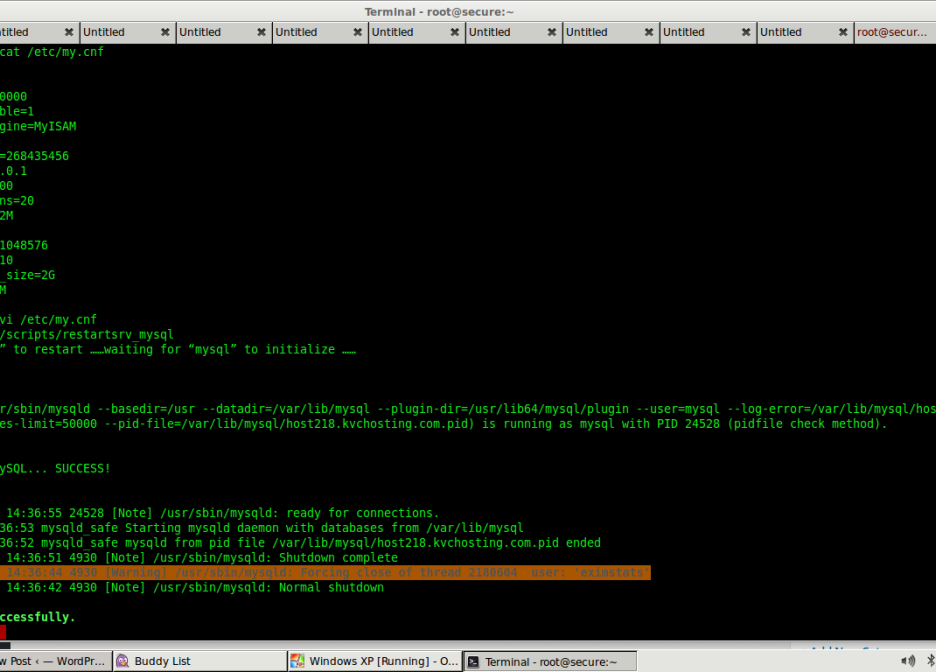 By Prasad Naik
Have you been getting below error “Error from MySQL query: DBD::mysql::db do failed: Can’t find any matching row in the user table” To fix this issue follow below method, Please remove the following entry from /etc/my.cnf and then restart MySQL: skip-name-resolve The restart mysql using /scripts/restartsrv_mysql This fixes the issue
Read More By Prasad Naik
VM creation has failed. Reason: No ploop support in the kernel, or kernel is way too old. Make sure you have OpenVZ kernel 042stab058.7 or later running, and kernel ploop modules loaded. Creation of container private area failed SOlusi : cek file berikut : It seems you are using EL5 kernel. Edit /etc/vz/vz.conf change: VE_LAYOUT=ploop […]
Read More By Prasad Naik
We tried to repair the smtp table in the eximstats database and it showed the following result. myisamchk: error: ‘/var/lib/mysql/eximstats/smtp.MYI’ is not a MyISAM-table Fix: ls -al /usr/local/cpanel/etc/eximstats_db.sql mysqladmin drop eximstats mysqladmin create eximstats mysql eximstats < /usr/local/cpanel/etc/eximstats_db.sql
Read More By Prasad Naik
This error occurs due to a missing file ‘ffmpeg_frame.lo‘ in the ffmpeg-php source, while your ffmpeg-php source may contain the file named ‘ffmpeg_frame.loT‘. – To Resolve this issue you just need to rename the ‘ffmpeg_frame.loT‘ to ‘ffmpeg_frame.lo‘ and make again
Read More
September 7, 2026


June 25, 2026


Keep your servers secure, optimized, and running smoothly with our reliable 24/7 server management and technical support.